In the Loop· August 31, 2026
The Hidden Cost of Switching Between Five AI Tools (and What Context Switching Really Costs)
Contents
Context switching between AI tools costs you time you can’t see and can’t get back. Every time you leave one tool or one chat and start another, your brain, and often the AI itself, has to reload the whole situation from scratch.
A jammed folder of AI output taught me that.
The Downloads folder that built CorpusWire
At one point mine was packed with documents: briefs, specs, implementation plans, SOPs, templates, feedback, lessons learned, all of it generated across dozens of separate AI chats, for dozens of separate tasks.
There was no system for any of it. No way to organize the material, no way for an AI to reference it later.
When I needed something specific, I relied on the computer’s own search function. That was slow, boring, and tedious in a way that made me put off looking until I really had to.
The worst part was that the better the work got, the faster the pile grew. I was being punished for using the tools well.
So I did what everyone does. I copied and pasted. Background, context, the same explanation of what I was trying to do, pasted into every session before the work could start.
The explanations burned through tokens too, the same background typed out a dozen times over.
The problem was volume. A pile of AI-generated documents had become real institutional knowledge, and there was nowhere for it to live where the AI could reach it. That’s the first law behind why most business knowledge goes unused: an asset you can’t reach isn’t an asset, it’s storage.
I already had an AI workflow, and it worked well. Realizing I had more raw material than any folder structure could handle, with no way to make it usable, is the reason CorpusWire exists.
The first fix was a Linear account. Every new task or project became an issue, and I built folders of documents linked to that issue reference, instead of one undifferentiated Downloads pile. It solved the filing.
It failed at the AI access. Having the right document sitting in the right folder made no difference if the AI still couldn’t see it.
I still had to open the folder, find the file, and copy it in myself. The tedium hadn’t gone anywhere, it had just moved one step downstream.
What context switching cost means
Context switching cost is the time and effort it takes to reorient after moving from one task or tool to another.
It’s the minutes afterward spent rebuilding what you already knew: what you’d figured out, what you’d decided, what you were about to do next. That was the real cost of my Downloads folder.
Gloria Mark, a researcher at UC Irvine, has spent over two decades studying how people work. Her finding: it takes an average of 23 minutes and 15 seconds to fully return to a task after an interruption.
RescueTime’s own usage data points in a similar direction, though the numbers never quite matched Mark’s: knowledge workers switch between roughly 56 apps and websites a day, close to 300 times.
I stopped trying to reconcile the studies. The 23-minute number is the one that matched what I was actually losing, so it’s the one I use.
Her studies measured human attention switching between tasks. My Downloads folder was a different flavor of the same tax.
The AI itself started from zero every time, on top of my own attention resetting. It had no memory of the last ninety conversations that mattered.
Why this hits harder with AI tools specifically
Every AI tool holds onto its own memory, or none at all. My chat tool had no idea what I’d told it yesterday, or what was already sitting in a spec three folders away, so I re-explained myself every time.
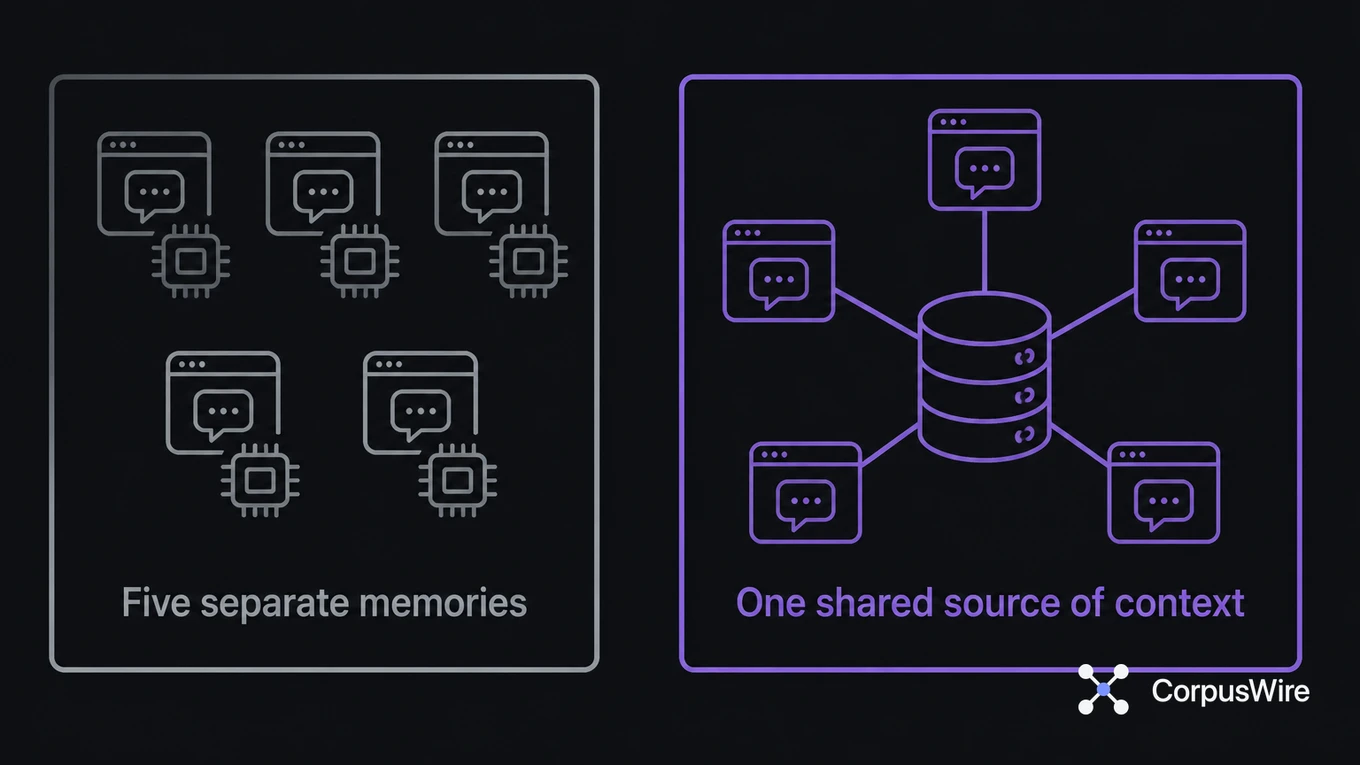
That’s rebuilding context from zero on top of Gloria Mark’s 23-minute penalty. Multiply that across five separate AI tools with five separate memories, and the tools start costing more than they save. You’re paying for the privilege of using them.
I still test this on myself sometimes. I’ll open whichever AI tool I’m using most that week and ask it what a client wanted changed on a specific brief, or which version of a document is current.
When the answer is “paste it in and I’ll take a look,” that’s the tax showing up in real time.
I was interrupting myself, chat by chat, document by document, and calling it working.
Token cost is part of that, and it’s easy to miss because it’s billed quietly in the background. Every time you re-paste the same background into a new chat, you’re paying for it twice: once in your own time, and again in whatever that tool charges to read it.
What happens when you switch
Your brain doesn’t jump cleanly from one task to another. It has to deactivate the goals tied to what you were just doing and activate a new set for what’s next. Researchers call this goal shifting, and it isn’t free.
There’s a second cost on top of it. Business researcher Sophie Leroy has studied what happens even after you’ve physically moved to a new task: part of your attention stays tangled up in the last one. She calls this attention residue.
Neither of these costs shows up on a calendar or a time tracker. In my case, they showed up as a Downloads folder I stopped being able to navigate at all.
What fixes it
You can’t eliminate context switching entirely. Some tools are built for different jobs, and work requires moving between tasks. But you can stop rebuilding context from zero every time you switch.
The real lever is a single, shared source of context that every tool and every session can draw from, instead of five separate memories that never talk to each other.
Here’s what I actually built. Documents still get filed once, into the same Linear-linked folders.
Those folders sync through Dropbox rather than Google Drive, mainly because local sync is faster and holds up offline. A lightweight watcher picks up every new or changed file and feeds it into a database built for retrieval, so any AI tool that can query it gets the same access.
I stopped uploading the same files to a chat project every time something changed. That habit alone, the repeated uploads to something like Claude Projects, was quietly consuming as much context and time as the copy-pasting had.
The difference still felt like switching from black-and-white television to color. The old version of my AI setup had no idea about my business. Once it could reach the history, projects, and decisions behind the work, it started giving answers instead of asking me to paste something in.
Batching similar work still helps: do all your research in one block, all your drafting in another. But even inside one block of work, each tool you touch still starts from zero unless something is holding the context for it.
The isolation between the tools is the problem.
FAQ
Does using more AI tools actually make you less productive? Past a certain point, yes. Each additional tool adds its own context to rebuild every time you return to it, and none of that rebuilding shows up as visible lost time.
How is this different from regular multitasking? Multitasking splits your attention within one session. AI tool switching adds a second layer: each tool starts from zero and doesn’t know what you already told a different one, so you’re re-explaining as well as re-focusing.
What happens when the retrieval gets something wrong? It happens. No retrieval system is perfect, and a wrong or stale document is worse than no document if you don’t catch it. I treat anything decision-critical as worth a manual check, the same way I would with a colleague’s summary. I’ve stopped trusting any tool that claims to be right every time.
Is any amount of tool switching fine? Yes. Quick reference checks rarely trigger the full 23-minute penalty. The cost shows up when you’re pulled fully out of one task before finishing it.
Want this running inside your own org?
Happy to show you how this fits your setup. 30-minute call, your documents, no prep needed.
Book a call →