In the Loop· September 6, 2026
Unstructured Data Management Software That Gets Used
Contents
- Why unstructured data management software gets bought, then ignored
- Storage isn’t the same as data you can question
- What “queryable” really means for your files
- Your documents deserve the rigour you give your numbers
- The quiet cost of files you can’t question
- The question test, in practice
- What “AI-powered” should really mean
- How to evaluate the category before you buy
- Storage tool, or an operating layer
- The one test that tells them apart
- FAQ
Most businesses can tell you last quarter’s revenue to the penny. Ask them what sits inside their own documents, and the room goes quiet. That silence is the whole problem.
Companies know their numbers. Almost none of them know their documents. The files exist, yet nobody can question them the way they question real business data.
I’ve watched teams buy tool after tool to close that gap. The files get uploaded, and then the software goes quiet too. So this post is about why that keeps happening, and what to look for instead.
Why unstructured data management software gets bought, then ignored
The pitch always sounds right. You’ve got contracts, proposals, reports, and support threads scattered across a dozen places. One tidy home for all of it feels like the obvious fix.
So the files land in a single place. Search finds them by filename, and the demo looks great. Then the tool quietly becomes another folder nobody opens.
The failure is rarely dramatic. Nobody cancels the tool in anger. It just slides down the list until the login is forgotten and the files gather dust.
Here’s the uncomfortable part. Storing a document isn’t the same as understanding it. Most software in this category stores files well and reads them not at all.
I’ve seen the same pattern in small teams and large ones. The software did exactly what it promised. It stored things, and storing things was never the real need.
By one widely cited IDC estimate, roughly 90% of company data is unstructured. That’s where the real answers live, and it’s the exact part these tools leave untouched.
Storage isn’t the same as data you can question
Think about how you treat your numbers. You don’t just store them somewhere safe. You query them, filter them, and push until they answer a question.
Your documents rarely get that treatment. They sit as files, not as data. So the knowledge inside them stays locked, even after you’ve paid to organise it neatly.
A shared drive is a warehouse. Everything’s in there somewhere, but finding the right box means knowing exactly what you’re looking for first.
Real business data works the other way round. You bring a question, and the data brings the answer back to you.
The fix isn’t more storage. It’s retrieval, the ability to pull the exact passage that answers a question on demand.
A traditional document management system is the filing cabinet. It’s strong at storage and weak at answers. That’s fine, as long as you know which one you’re buying.
What “queryable” really means for your files
Queryable is the word that matters in this whole category. It means you can point a question at a pile of documents and get a straight answer back.
A semantic search understands meaning, not just matching words. Ask about “late payments” and it finds the overdue-invoice clause you never thought to tag.
That’s the leap from keyword matching to comprehension. It’s also the line most “document software” never crosses, whatever the marketing says.
None of this needs a data-science team. It needs the right software making a promise it can keep: bring a question, get an answer with a source.
Your documents deserve the rigour you give your numbers
Nobody would run a business off a spreadsheet they can’t sort or filter. Yet that’s exactly how most teams treat their documents.
The numbers get structure, queries, and a dashboard on the wall. The documents get a drive, a naming convention, and a quiet hope that someone remembers where things are.
Closing the gap doesn’t mean more discipline from your team. It means software that reads the files, not just holds them. The rigour should live in the tool, not in people’s memory.
The quiet cost of files you can’t question
An ignored document tool isn’t only wasted spend. It’s every answer that stays buried while someone rewrites it from scratch.
The sharp onboarding doc, the reason behind your pricing, the story of why a past deal collapsed. All of it sits in files, unread, right when a new hire needs it most.
That lost knowledge has a name. It’s institutional memory, and files in a folder let it leak away one forgotten document at a time.
There’s a hidden tax too. When answers aren’t retrievable, people ask each other, wait for replies, and quietly repeat work that was already done.
Numbers get dashboards and daily attention. Documents get a shared drive and a search box that only matches filenames. The imbalance is the opportunity.
The question test, in practice
Picture a new starter on day one. They ask why a big client churned last spring, a question every veteran can half-answer.
With storage, they get a folder of old files and a long afternoon of reading. With retrieval, they get the answer and a link to the exact page it came from.
Same documents, same company. The only variable is whether the software treats those files as data or as dead weight.
That’s the test in miniature. Not can it store the file, but can it answer the question the file was written to settle.
Multiply that afternoon across every new hire and every forgotten decision. The cost of un-queryable documents is real, it’s just invisible on the invoice.
What “AI-powered” should really mean
Plenty of tools now wear an AI label. Far fewer can show what that label buys you. The test is simple: ask a real question, then see if the answer cites your own documents.
If the software can’t point to the source page, it’s guessing. A grounded answer names its evidence. A guess just sounds confident.
Ask the vendor one thing. When an answer is wrong, can you see which document it came from and correct it. Silence there tells you plenty.
I’ve written before about what makes a knowledge base genuinely AI-powered. The honest answer is retrieval, not branding.
How to evaluate the category before you buy
If you’re comparing options right now, skip the feature grids. Test each tool against the jobs your documents should do. A few checks separate real answers from expensive storage.
- Ask it a real question. Not a keyword search, an actual question. See whether it returns an answer or just a list of files to open yourself.
- Check the citation. A trustworthy answer links to the source document and page. No source means no trust, however smooth the reply reads.
- Feed it something new. Upload a fresh document and ask about it straight away. Capable tools handle new files without a slow rebuild.
- Ask a question with no answer. The tool should decline, not invent. A confident hallucination is worse than an honest blank.
- Watch it at scale. Ten files is easy. The real test is thousands of documents that change every week.
Most capable tools in this space use retrieval-augmented generation. It pays to understand what RAG really means before you sign anything.
Ungrounded chatbots still get plenty wrong, which is why accuracy is worth checking yourself. If budget is tight, weigh the open-source route and its real trade-off too.
Storage tool, or an operating layer
The clearest way to see the gap is a question. A storage tool answers “where is the file.” An operating layer answers “what does the file say.”
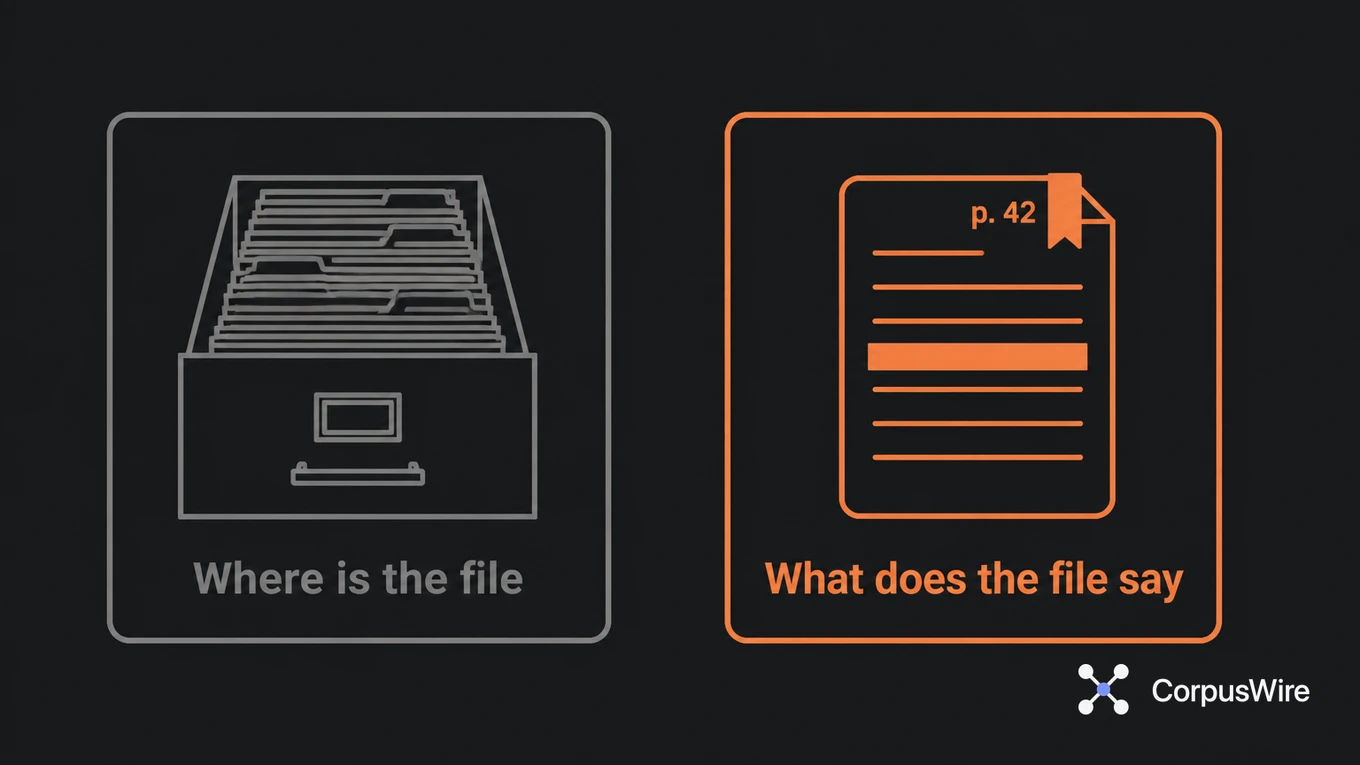
That shift, from a knowledge system to an operating layer, is the entire point. It turns documents into something you can question like a colleague.
Price rarely reveals the difference. Two tools can cost the same and do fundamentally different jobs, one filing, one answering.
The word “layer” matters. It sits under everything you already do, feeding answers into the tools and chats where work happens. You don’t visit it, it comes to you.
Both can look identical in a demo. The difference shows up on day thirty, when the storage tool is forgotten and the operating layer is the first tab you open.
The one test that tells them apart
So here’s the single check before you spend a penny. Load a document, ask it a question, and see if the answer is correct and sourced.
Don’t let a slick interface stand in for that check. A demo can hide behind five hand-picked files. Your real corpus won’t be so tidy.
That’s the line between software you buy and software you use. Everything else is packaging around that one moment.
If you’d rather build this on purpose than shop for it blind, I’ve mapped the whole approach in Build Your Own Brain. It treats your documents as queryable data from the first day.
FAQ
What is unstructured data management software? It’s software for storing and, ideally, questioning documents like contracts and reports. The better tools let you retrieve sourced answers, not just locate files.
Why do teams stop using these tools? Most only store files, so the knowledge inside stays locked. Without real retrieval, the tool becomes another folder nobody opens.
How do I tell if a tool treats documents as data? Ask it a question and check the reply. If it cites the source document and page, it’s treating your files as queryable data.
Is this just a document management system? Not quite. A document management system focuses on storage, while this category is judged on whether you can question the content.
Want this running inside your own org?
Happy to show you how this fits your setup. 30-minute call, your documents, no prep needed.
Book a call →