In the Loop· September 2, 2026
How to Export ChatGPT Conversations, and Why It Isn’t Enough
Contents
The export button isn’t the whole story
Search “export chatgpt conversation” and most results give the same walkthrough. Open Settings, find Data Controls, click Export, wait for an email, download a zip file. That part is accurate.
It’s also incomplete. The button does exactly what it says. The real question underneath the search, whether you can actually keep and reuse what a conversation built, doesn’t get answered by a walkthrough of five clicks.
Exporting and reusing turn out to be two different problems wearing one name.
How to actually export a conversation
The steps themselves are simple, and worth having in one place. In ChatGPT, open Settings, then Data Controls, then select Export Data.
Confirm the request. ChatGPT emails a download link once the file is ready, usually within a few minutes for most accounts, though it can take longer for a very long history.
The link expires after a set window, so download promptly rather than leaving it sitting in an inbox. The zip file that downloads contains the full account history, not a single chat picked out on its own.
What’s actually inside the export
Two files matter inside that zip. conversations.json holds every message from every chat, structured as raw data rather than something meant for casual reading.
chat.html renders the same data as a static, scrollable page that opens in any browser with no setup. For a personal archive, something to hand to a lawyer or read offline, this does the job well.
It was built for portability and record-keeping. Not for feeding a conversation back into a working session.
Where “memory” fits, and where it doesn’t
ChatGPT also has a separate memory feature, easy to confuse with export since both promise some version of not starting over. Memory works differently: when it’s turned on, ChatGPT can retain specific facts you’ve told it, like your role or a recurring project, and quietly apply them in future chats.
That’s useful, and it’s automatic in a way export isn’t. But memory holds facts, not transcripts. It doesn’t hand back a full prior conversation, and it has real limits on how much it retains before older entries get dropped.
Neither feature solves what the search term is really asking about: getting a specific past conversation back, in full, usable inside a new one.
What exporting doesn’t solve
The gap shows up the moment you try to use an exported conversation for anything beyond reading it. A new chat starts with no memory of the old one. conversations.json sitting in a Downloads folder doesn’t change that.
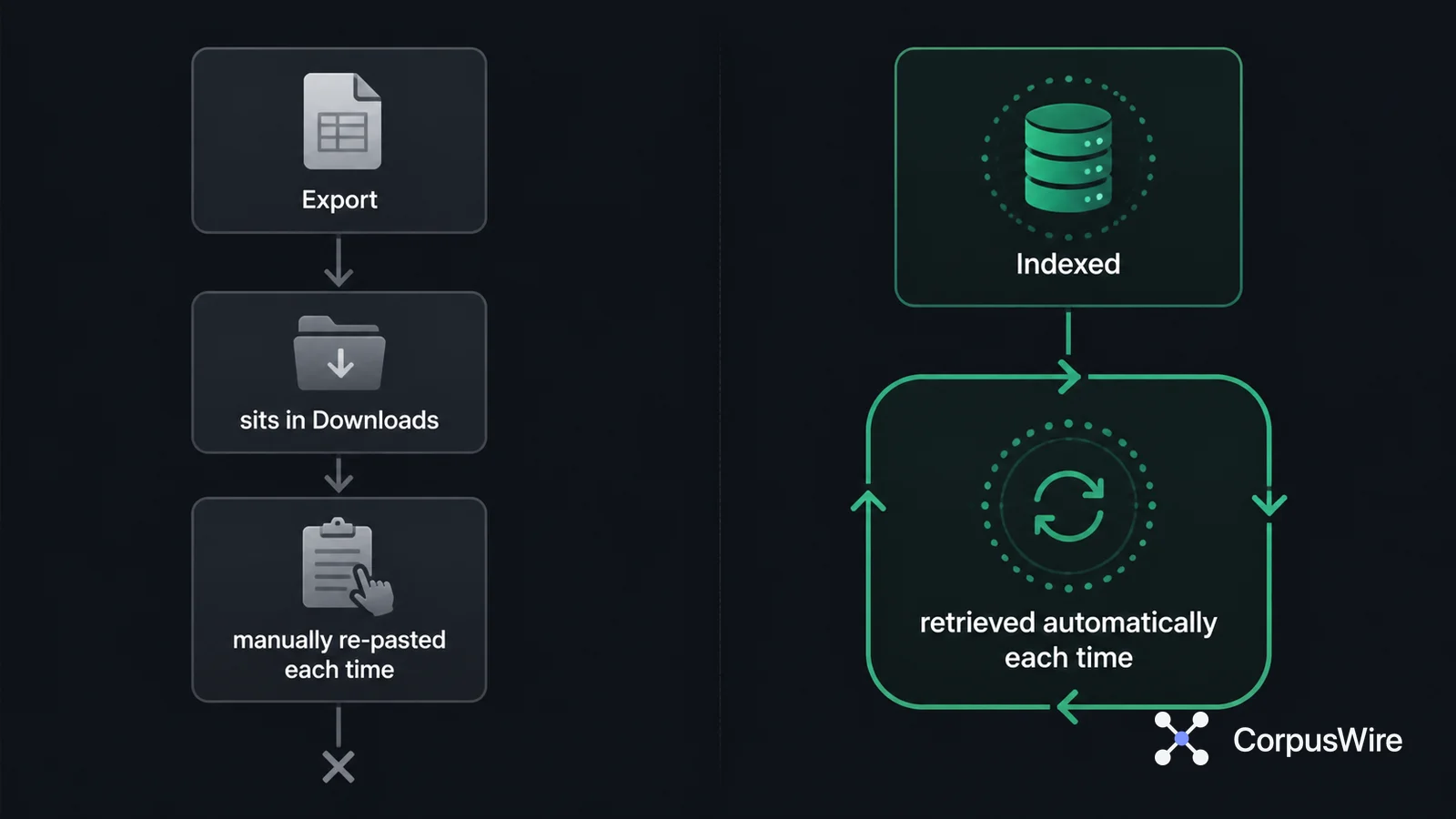
Getting that context back means opening the file, finding the relevant part, copying it, and pasting it into the new conversation as manual context. Every time you need it again, the same three steps repeat.
The export is doing exactly what a file does: sitting still until a person moves it. It’s the same problem CorpusWire’s first law names directly: an asset you can’t reach isn’t an asset, it’s storage.
Some people work around this by pasting exported chats into a notes app or a Notion page, hoping search will do the finding for them later. It helps a little. It still leaves a person responsible for remembering which page to search and when.
For a single conversation revisited once, that round trip is mildly annoying at worst. For anyone running the same project across dozens of sessions, tracking down and re-pasting the right fragment from the right export becomes its own small ongoing task.
The problem sits upstream of the export button itself. A one-time snapshot can’t behave like a live, queryable memory, no matter how clean the download is or where it’s pasted afterward.
A few practical details worth knowing
The export is account-wide, not per-chat. There’s no built-in way to export a single conversation on its own; requesting an export always pulls the full history.
Images and other multi-modal content are referenced in conversations.json rather than embedded directly, so a chat full of generated images exports as data plus links, not a self-contained media file.
For anyone exporting specifically to satisfy a data request, such as under GDPR, the same Data Controls panel is the correct starting point, and the resulting file is the same one covered above.
What would actually persist
The real difference is whether a system goes and finds the relevant part for you, or whether you have to remember where you put it and paste it in yourself. An export is a copy of the past. Persistence means the past stays queryable going forward.
That’s a retrieval problem, not a file-format one. A folder of exports and an indexed document store can hold the exact same words and still behave completely differently in practice.
CorpusWire’s own Brain works on that second model. It runs retrieval against an indexed corpus of a company’s own documents, so the relevant part surfaces on its own instead of requiring someone to already know which file has the answer.
None of this makes ChatGPT’s export a bad feature. It’s the right tool for a backup or a one-time reference.
It’s simply not the tool for staying inside a conversation’s context across sessions. The volume behind “export chatgpt conversation” suggests plenty of people are reaching for it hoping it’s both.
FAQ
Does exporting a ChatGPT conversation let me continue it later with full context intact? No. The export is a static copy of the messages, not a live session. Continuing with the same context means manually finding and pasting the relevant part back into a new chat.
Is ChatGPT’s memory feature the same thing as exporting conversations? No. Memory retains specific facts across chats automatically, but not full transcripts, and it has limits on how much it holds. Export gives you the full transcript but nothing automatic about reusing it.
Want this running inside your own org?
Happy to show you how this fits your setup. 30-minute call, your documents, no prep needed.
Book a call →